Visual monitoring that knows when a page looks wrong.
website issue monitoring
Visual Sentinel takes real-browser screenshots of your live pages, compares them to the last good version, and alerts you when layouts shift, images disappear, or a section breaks. Visual monitoring (screenshot change detection) catches what an uptime check cannot see, because a page can load successfully and still look broken.
Solo is $6/month. Eligible customers get a 10-day card trial, then pay on day 11 unless cancelled. Free excludes visual checks.
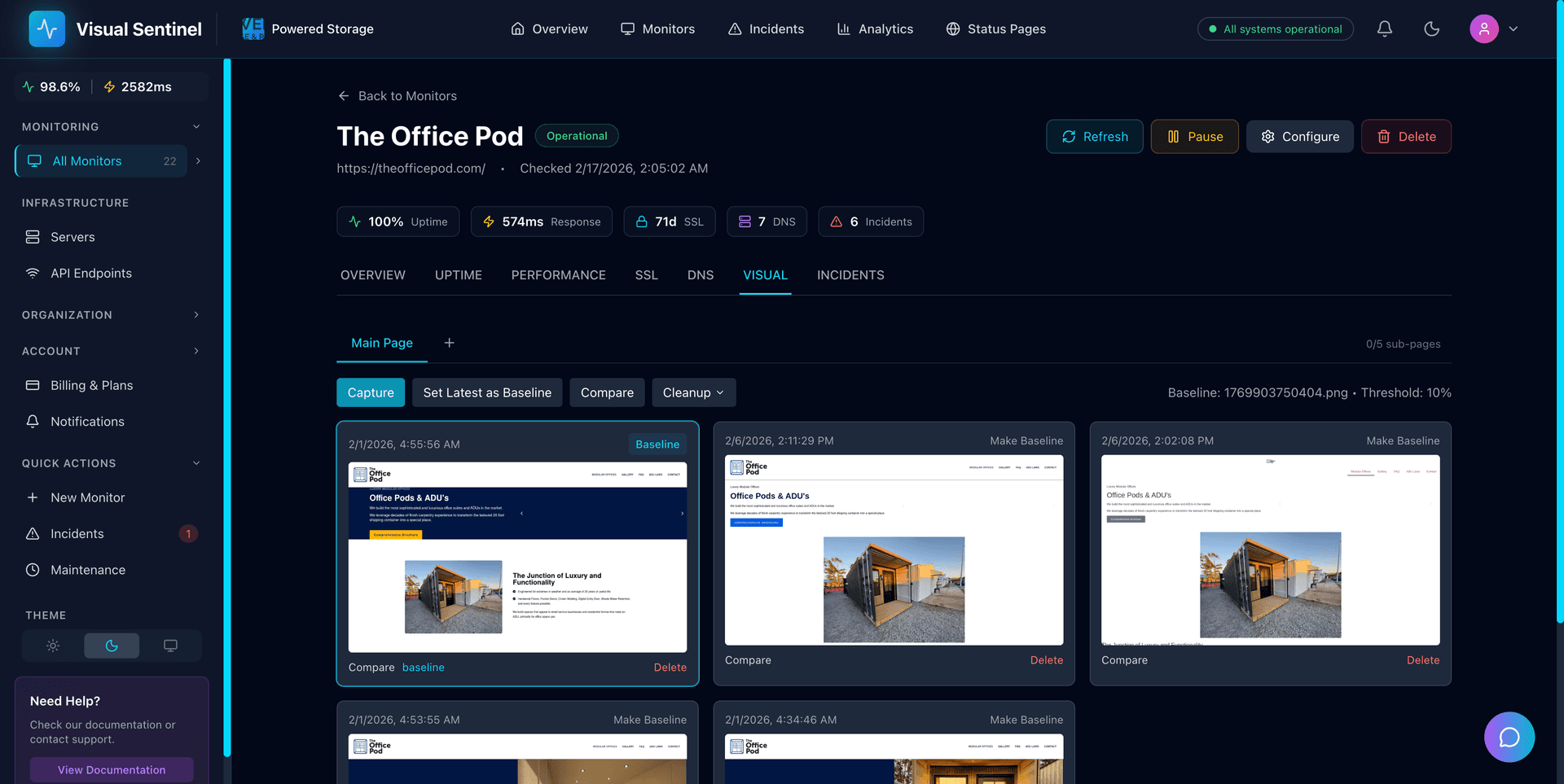
What Is Visual Monitoring?
Visual monitoring (also called screenshot monitoring or visual website monitoring) takes scheduled screenshots of your live pages and compares them against a known-good baseline. When CSS breaks, an image disappears, a layout shifts, or a third-party script changes the page, you get an alert with a side-by-side diff. A page can load successfully while showing a blank screen or broken design. Uptime tools miss that. Visual Sentinel renders pages in a real Chromium browser the way visitors see them, then compares each screenshot with a configurable sensitivity threshold so ads and timestamps do not flood you with noise.
What our users say.
“I tried UptimeRobot and ChecklyHQ, but neither solved the problem of finding broken pages until we checked manually. With Visual Sentinel, we get instant alerts and can fix our WordPress sites quickly instead of finding issues by accident.”
Eric D.
Powered Storage
“We run an agency and due to Elementor updates or cache issues, some client websites would break. We only found out from client complaints because UptimeRobot didn't catch visual issues. After switching to Visual Sentinel, we get alerts about broken pages in minutes. Would recommend 5/5.”
Jeff QB
The DWCO
“Managing many projects, I can't always keep an eye on every website. When something broke after an update, we wouldn't know until someone reached out. After using Visual Sentinel, life has become a lot easier knowing we'll be alerted via Slack and any team member can jump on it immediately.”
Shahid K.
CueBytes
Built for issues
customers actually notice.
Automated Screenshots
Each scheduled visual check renders your page in a real browser and stores a full-page screenshot. Visual captures run every 30 minutes on Solo or every 15 minutes on Starter and higher.
Pixel-Level Comparison
Detect layout shifts, missing assets, font changes, and color differences before they become support tickets.
Adjustable Sensitivity
Set your own threshold for what counts as a "change." Ignore dynamic content like ads or timestamps while catching real issues.
Scheduled Visual Change Alerts
When a scheduled visual check detects a qualifying change, route an alert with side-by-side evidence of what changed.
Screenshot History
Browse historical screenshots to see how your site has evolved. Pinpoint exactly when a visual issue was introduced.
More Than Screenshots
Screenshot monitoring runs alongside uptime, performance, SSL, DNS, and content checks in the same monitor.
Monitor Website Changes Automatically
Track visual changes and, on Starter or higher, configured content elements on their scheduled checks. Get evidence when a monitored change crosses your threshold.
Most monitors only watch for outages. Visual Sentinel watches for changes too. On each scheduled visual check, we render the page in a real browser, take a full-page screenshot, and compare it pixel-by-pixel against the most recent confirmed baseline. If the difference exceeds your configured threshold, an alert can include a side-by-side comparison and a highlighted diff image. Solo visual checks run every 30 minutes; Starter, Business, and Agency run them every 15 minutes.
Pair visual monitoring with Starter-or-higher content monitoring, which extracts visible text from configured CSS selectors in fetched source HTML. That combines “the page looks different” screenshot evidence with “the configured text changed” evidence. The content worker does not execute page JavaScript or diff arbitrary markup.
Common change-monitoring use cases
- Catch deploy regressions. When a CSS update shifts the hero, breaks the checkout button, or drops a section, the next visual check can produce an alert with a screenshot diff.
- Watch competitor pricing. Track the price element on a competitor's pricing page; get notified the moment they raise or drop prices.
- Watch product availability. Track the “Add to cart” or “Out of stock” element on a target product page; get alerted when it changes state.
- Government and policy pages. Track legal text, deadlines, or policy updates on .gov pages without checking them manually.
- Content drift detection. If your CMS allows team edits, content monitoring catches accidental edits to legal pages, pricing tables, or product descriptions.
- Third-party widget watching. When a third-party script (analytics, chat widget, ad provider) starts distorting the layout, visual monitoring flags it before your users do.
How the change-detection threshold works
Each monitor has a configurable visual mismatch threshold (default 5%). The diff is calculated across the full rendered page; if more than the threshold percentage of pixels differ between the new screenshot and the baseline, the monitor flags a change. For pages with dynamic content (timestamps, ads, rotating featured items), raise the threshold; for pages where every pixel matters (a tightly designed landing page, a checkout flow), lower it.
For text-specific tracking on Starter or higher, content monitoring follows the uptime cycle while visual captures keep their separate schedule. Define one or more CSS selectors per monitor; the content check extracts the selected text and can alert when it changes. It answers a narrower question than the pixel comparison.
Check frequency
Visual monitoring starts on Solo. Solo captures every 30 minutes; Starter, Business, and Agency capture every 15 minutes. Free includes HTTP uptime and SSL checks, but not visual captures. Business and Agency add 1-minute uptime checks while visual captures remain at 15 minutes.
Permanent Free plan, 3 HTTP + SSL monitors, no card required.
Caught in the Wild
These are real production issues detected by Visual Sentinel. No demos, no staging, actual monitoring in action.



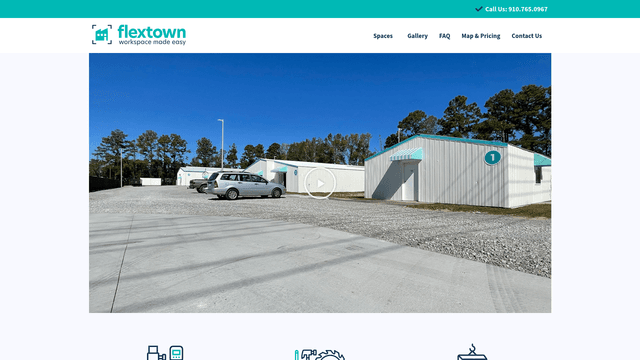
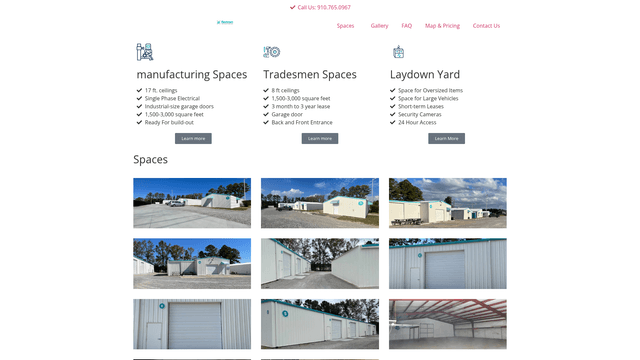
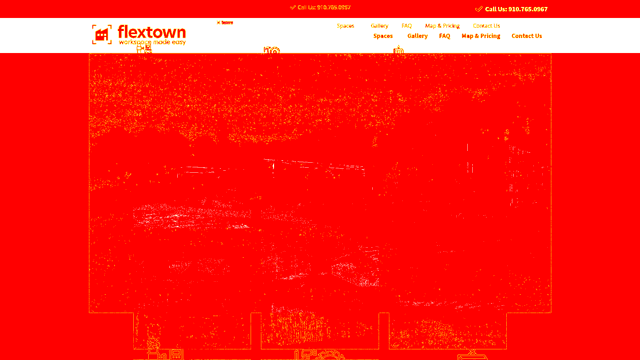
Visual monitoring, not just page-change alerts
Tools built only for website change detection (for example Visualping) watch a page for visual or text edits. That is useful. Production sites also go down, lose SSL, drift DNS, expire domains, or respond as healthy while the layout is quietly broken. Visual Sentinel covers those layers on the same monitor.
Change-detection only
- Screenshot or text watch on selected URLs
- Strong for competitive price or content tracking
- Usually separate from uptime and SSL tooling
Visual Sentinel
- Visual monitoring with real-browser screenshots and diffs
- Uptime, SSL, DNS, performance, content, domain expiry
- Multi-site agency workflows and public status pages
Related guides
Want the method behind the screenshots?
Read the privacy-safe visual regression methodology and synthetic fixture before monitoring a real site.
Read the visual regression methodologyThree steps,
no extensions.
Add Your Page
Enter the URL you want to visually monitor. We capture a baseline screenshot immediately.
Set Sensitivity
Choose how sensitive the comparison should be. Filter out dynamic elements that change normally.
Review Changes
When we detect a visual change, you get an alert with a side-by-side comparison showing exactly what changed.
Answers,
in plain English.
Can't find what you're looking for? Email support.
Start watching the pages your visitors see.
start watching in 60 secondsSolo is $6/month. Eligible customers get a 10-day card trial, then pay on day 11 unless cancelled. Free excludes visual checks.