What is ClickFix?
ClickFix is not classic malware. Microsoft describes it as the name given to a social engineering technique.[2] The page does not need to break into the visitor's computer. It persuades the visitor to do that part: copy a command, paste it into a system window and run it. Microsoft notes that because the person runs the command themselves, a campaign can get past conventional and automated security tools.[1] Security frameworks file it under “Malicious Copy and Paste” (MITRE ATT&CK technique T1204.004).[3]
Reports place ClickFix activity in early 2024. Proofpoint saw it as early as 1 March 2024.[4] Microsoft first observed it between March and June 2024, in email campaigns.[1]
In Microsoft's 2025 Digital Defense Report, ClickFix was the most common way in (“initial access method”) that Microsoft Defender Experts saw in their notifications over the previous year, accounting for 47% of attacks.[5]
Microsoft's 2026 report looks at a different measure: devices that ran ClickFix-style commands between February and early May 2026. It calls that “roughly an eightfold increase” and does not say what period it is compared with.[6]
How a ClickFix attack works
A ClickFix attack has two parts: a page that shows a believable problem, and a command the page has already copied to the visitor's clipboard. In one campaign Microsoft studied, clicking the “I'm not a robot” prompt was the moment the command was copied.[7]
The fake “Verify you are human” check
The lure looks like something people click through every day: a “Verify you are human” box, a CAPTCHA, or an error saying the page cannot load until you fix something.[1, 8] Some copy the look of brands people trust. Microsoft has seen fakes styled after Discord and Booking.com.[1, 9]
On a hacked site, the visitor sees the real page first. In Microsoft's words, “the original page is briefly displayed before it's replaced with the ClickFix human verification lure.”[1, 8]
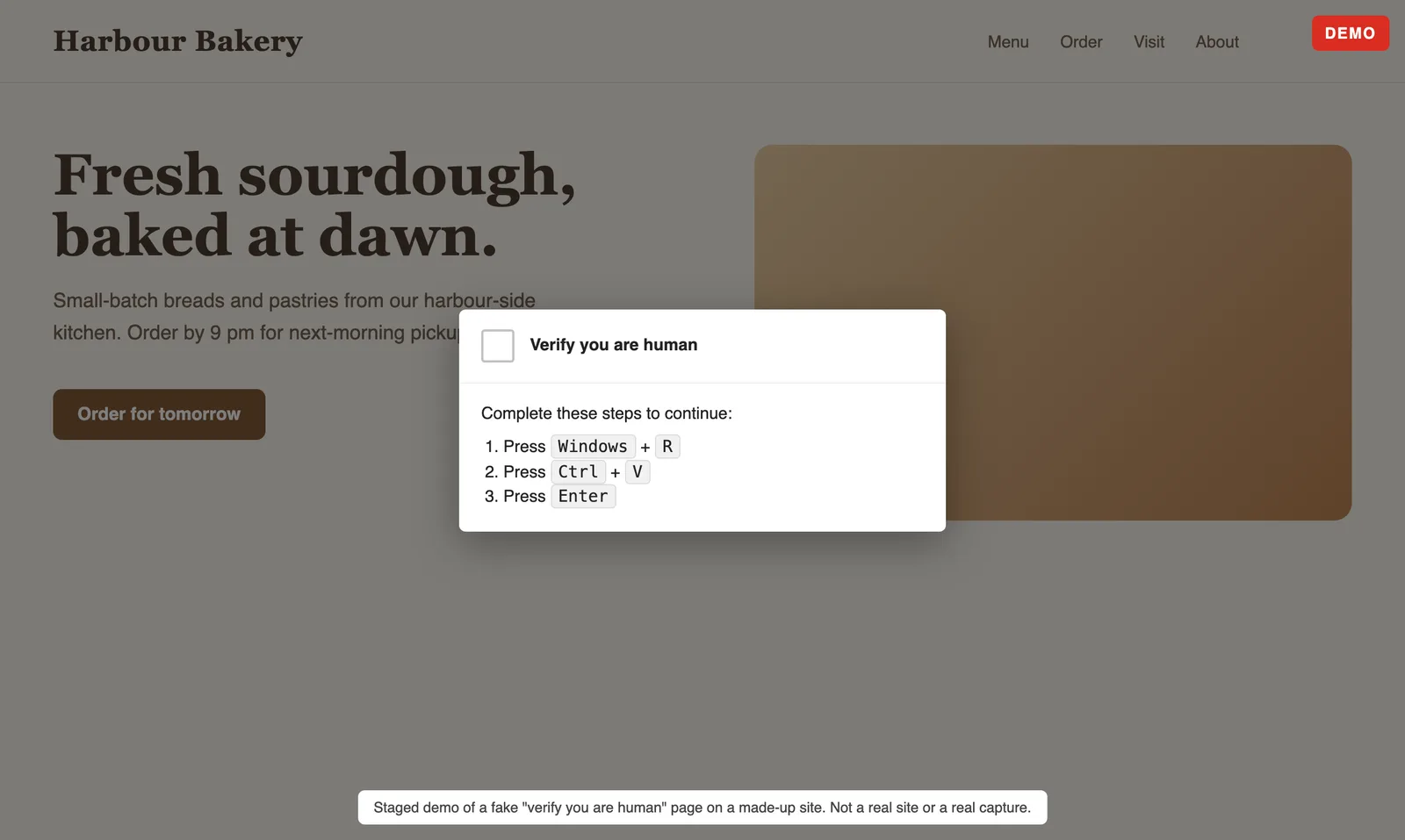
The three-step sequence
The instructions are short. The FBI describes them as: open the Windows Run window (Windows key + R), paste what is on the clipboard (Ctrl + V), and press Enter.[10] What lands in the Run window is the hidden command the page copied earlier. Pressing Enter starts a malicious, encoded PowerShell process.[10]
Variants change the keys, not the idea. Some lures ask for Windows + X, which opens a menu with a terminal in it.[11] Others send people straight to Windows Terminal or PowerShell.[8] Mac users are told to paste a command into Terminal.[12, 13]
What it installs
The ClickFix malware that follows is mostly built to steal or to give the attacker remote control. Microsoft says Lumma Stealer “appears to be the most prolific ClickFix final payload”. It has also seen XWorm, AsyncRAT, NetSupport and DarkGate on Windows, and Atomic macOS Stealer (AMOS) on Macs.[1]
A way into company networks
ClickFix can also be the first step into a company network. In some instances, the FBI saw Interlock ransomware actors use ClickFix to get their initial access.[10] Our guide to ransomware warning signs on a website covers what an attack like that can look like from the outside.
Real check or fake?
One rule settles it. A real CAPTCHA or error message never asks you to open the Windows Run dialog or paste a command into a terminal.[2] On a Mac, no real download, CAPTCHA or verification step asks you to paste a command into Terminal.[13] If a page asks you to, close it.
Why real websites end up serving ClickFix
People reach a ClickFix lure in several ways, including a phishing email, a malicious ad, or a visit to a compromised or malicious website.[1] The third route is the one site owners need to know about. Attackers break into legitimate websites and insert JavaScript that shows the lure to visitors.[7, 14] The attackers want your visitors, and your site is how they reach them.
How they get in is less clear, and the sources disagree. Microsoft has seen sites compromised “potentially through WordPress vulnerabilities”.[1] GoDaddy tracked a ClickFix campaign that logged in with stolen credentials and installed fake plugins, and said it was not related to any known WordPress vulnerabilities.[15] Possible routes include unpatched software and stolen logins.
One long-running operation, known as ClearFake, injects code into legitimate sites, mostly WordPress, and has used ClickFix since April 2024.[4, 17]
Updates alone are not enough. Sekoia found that many sites infected by another framework, IClickFix, ran current or near-current WordPress, and it could not say how they were first breached.[16] The FBI also saw Interlock ransomware actors get in through drive-by downloads from compromised legitimate websites.[10]
The lure is not always shown to everyone. ClearFake showed it only after a script passed various checks.[4] IClickFix sends only selected visitors to it.[16] Google warns that hackers hide content from site owners and often target only certain browsers, or visitors arriving from certain links.[18] That is why a site can look fine when its owner checks it.
Signs your website is serving it
Any one of these is worth investigating straight away:
- A visitor or customer mentions a “Verify you are human” step or a “fix it” prompt you never added, often appearing after the real page has shown for a moment.[1, 16]
- Google Search Console shows a Security issues warning, for example “Social engineering”, which covers content that tricks visitors into doing something dangerous.[18]
- Your site is blacklisted by Google or Bing, your host disables it, or new user accounts appear that nobody created.[19]
- Plugins you do not recognise, with generic names, whose folders contain “only 3 small files”.[15]
- Scripts loading from sites you do not know, or scrambled (obfuscated) code in your pages.[18]
- Pages look different when you open them from a computer outside your own network. Google warns that hackers often hide injected content from site owners.[18]
What you should not rely on is your uptime check. The page still loads, and loads quickly, so a check that only asks whether the site is up can stay green the whole time.
What to do in the first hour
If your site is showing a ClickFix prompt, work through these steps in order. They use WordPress terms because many of the hacked sites in these reports run WordPress,[17, 16] but the same order works on other platforms.
- Preserve evidence. Before you change anything, save copies of the affected pages, the site files and your server logs. Our defacement investigation guide covers what to keep.
- Put the site into maintenance mode so visitors stop seeing the prompt while you work.
- Reset every password. Force a password reset for all users, especially administrators, and update the secret keys in wp-config.php so anyone still signed in is signed out.[19]
- Change every other way in: FTP or SFTP, wp-admin, cPanel and the database. Turn on two-factor or multi-factor sign-in.[19]
- Scan the computers that hold those logins. WordPress.org notes that an infection often starts on the owner's own computer, and GoDaddy notes that infostealers can take cPanel and WordPress logins.[19, 15]
- Remove the rogue plugin and injected code, or restore the last good backup.[19, 18]
- Change the passwords again once the site is clean.[19]
- Ask Google to review the site if Search Console flagged it. Use Request Review. Google says a review can take several days or weeks.[18]
- Report it to the FBI's Internet Crime Complaint Center (IC3) or to CISA.[10, 20]
- Consider telling visitors who may have seen the prompt, so anyone who ran the command can follow the next section.
If you run client sites
When the hacked site belongs to a client, the people at risk were that site's visitors.[1, 16] Tell the client what happened and what visitors may have seen, then run the list above for that site. Check any other client sites that share its hosting, logins or plugins. Our client-site setup guide covers how to keep watch across many sites.
If you already ran the command
If you followed the steps on a page like this, act now:
- Disconnect the computer from every network: wired, Wi-Fi and Bluetooth.[2]
- Update your security software and run a full scan.[2]
- Change the passwords for everything that computer could reach. Microsoft says credential rotation should be prioritized for any credentials reachable from the affected machine.[8] Do it from a different, clean device.
- If it is a work computer, report it to your IT or security team.[2]
How to stop ClickFix
On your team's computers
The simplest rule is the best one: never paste and run a command a web page gives you. Microsoft's advice includes making sure people know what they copy and paste.[1] For Windows admins, Microsoft also suggests:[1]
- Turn off the Run dialog (Windows + R) with Group Policy where staff do not need it.
- Set Windows Terminal to warn before a multi-line paste.
- Turn on PowerShell script block logging.
- Turn on the attack surface reduction rules that block possibly obfuscated scripts, and that block JavaScript or VBScript from launching downloaded content.
Train people to spot, avoid and report prompts like these.[10]
On your website
Keep WordPress, themes and plugins patched, turn on multi-factor sign-in, remove plugins you do not use, and keep tested backups.[19] Those steps protect the way in. You also need to know when a page starts showing something you did not put there. That is what visual monitoring and content monitoring are for. For a wider comparison of tools, see our guide to website defacement monitoring.
Frequently asked questions
Sources
Every source was read on 8 November 2026. Numbers in brackets in the text point to this list.
- Microsoft Threat Intelligence, “Think before you Click(Fix): Analyzing the ClickFix social engineering technique”, 21 August 2025. https://www.microsoft.com/en-us/security/blog/2025/08/21/think-before-you-clickfix-analyzing-the-clickfix-social-engineering-technique/
- Microsoft Security Intelligence, “Behavior:Win32/ClickFix.SZ”, updated 1 October 2025. https://www.microsoft.com/en-us/wdsi/threats/malware-encyclopedia-description?Name=Behavior%3AWin32%2FClickFix.SZ&ThreatID=2147937103
- CISA Eviction Strategies Tool, “Malicious Copy and Paste (T1204.004)”, modified 12 May 2026. https://www.cisa.gov/eviction-strategies-tool/info-attack/T1204.004
- Proofpoint, “From Clipboard to Compromise: A PowerShell Self-Pwn”, 17 June 2024. https://www.proofpoint.com/us/blog/threat-insight/clipboard-compromise-powershell-self-pwn
- Microsoft, “Microsoft Digital Defense Report 2025 (PDF)”, 2025. https://cdn-dynmedia-1.microsoft.com/is/content/microsoftcorp/microsoft/msc/documents/presentations/CSR/Microsoft-Digital-Defense-Report-2025.pdf
- Microsoft, “2026 Digital Defense Report”, 2026. https://www.microsoft.com/en-us/security/security-insider/threat-landscape/2026-digital-defense-report
- Microsoft Threat Intelligence, “Lumma Stealer: Breaking down the delivery techniques and capabilities of a prolific infostealer”, 21 May 2025. https://www.microsoft.com/en-us/security/blog/2025/05/21/lumma-stealer-breaking-down-the-delivery-techniques-and-capabilities-of-a-prolific-infostealer/
- Microsoft Threat Intelligence, “TerminalFix campaign deploys a reverse tunnel through multistage intrusion”, 28 August 2026. https://www.microsoft.com/en-us/security/blog/2026/08/28/terminalfix-campaign-deploys-reverse-tunnel-through-multistage-intrusion/
- Microsoft Threat Intelligence, “Phishing campaign impersonates Booking.com, delivers a suite of credential-stealing malware”, 13 March 2025. https://www.microsoft.com/en-us/security/blog/2025/03/13/phishing-campaign-impersonates-booking-com-delivers-a-suite-of-credential-stealing-malware/
- FBI, CISA, HHS and MS-ISAC, “Joint advisory AA25-203A: #StopRansomware: Interlock”, 22 July 2025. https://www.cisa.gov/news-events/cybersecurity-advisories/aa25-203a
- Palo Alto Networks Unit 42, “Fix the Click: Preventing the ClickFix Attack Vector”, 10 July 2025. https://unit42.paloaltonetworks.com/preventing-clickfix-attack-vector/
- Microsoft Threat Intelligence, “ClickFix campaign uses fake macOS utilities lures to deliver infostealers”, 6 May 2026. https://www.microsoft.com/en-us/security/blog/2026/05/06/clickfix-campaign-uses-fake-macos-utilities-lures-deliver-infostealers/
- Microsoft Threat Intelligence, “From open lures to cloaked gates: How a macOS ClickFix campaign learned to hide”, 5 August 2026. https://www.microsoft.com/en-us/security/blog/2026/08/05/macos-clickfix-campaign-learned-hide/
- Center for Internet Security (MS-ISAC), “ClickFix: An Adaptive Social Engineering Technique”, 27 October 2025. https://www.cisecurity.org/insights/blog/clickfix-an-adaptive-social-engineering-technique
- GoDaddy Security, “Threat Actors Push ClickFix Fake Browser Updates Using Stolen Credentials”, 17 October 2024. https://www.godaddy.com/resources/news/threat-actors-push-clickfix-fake-browser-updates-using-stolen-credentials
- Sekoia, “Meet IClickFix: a widespread WordPress-targeting framework using the ClickFix tactic”, 29 January 2026. https://www.sekoia.com/blog/meet-iclickfix-a-widespread-wordpress-targeting-framework-using-the-clickfix-tactic
- Sekoia, “ClearFake's New Widespread Variant: Increased Web3 Exploitation for Malware Delivery”, 18 March 2025. https://www.sekoia.com/blog/clearfakes-new-widespread-variant-increased-web3-exploitation-for-malware-delivery
- Google Search Console Help, “Security issues report”, read 8 November 2026. https://support.google.com/webmasters/answer/9044101
- WordPress.org, “FAQ My site was hacked”, read 8 November 2026. https://wordpress.org/documentation/article/faq-my-site-was-hacked/
- FBI and CISA, “Joint advisory AA25-141B: Threat Actors Deploy LummaC2 Malware to Exfiltrate Sensitive Data from Organizations”, 21 May 2025. https://www.cisa.gov/news-events/cybersecurity-advisories/aa25-141b
Run a website of your own? Read about keeping watch over your own website, so an alert tells you when something on it breaks.
See your site checked
Add your site and its uptime and SSL certificate are checked for one hour. Visual checks start with a paid plan: try one free for 10 days (no card with a work email) or subscribe, from $15 USD a month.
Start 10-day trial